
During my attendance at KubeCon, I had the opportunity to participate in the Azure day with Kubernetes.
A new tool currently under development was presented: retina
What is Retina?
Retina is a tool for monitoring the network and services of AKS clusters. Its goal is to collect customizable telemetry and push it to various backends (Prometheus, via a PV, etc.).
How it works
Retina offers several data collection modes:
Via the CLI
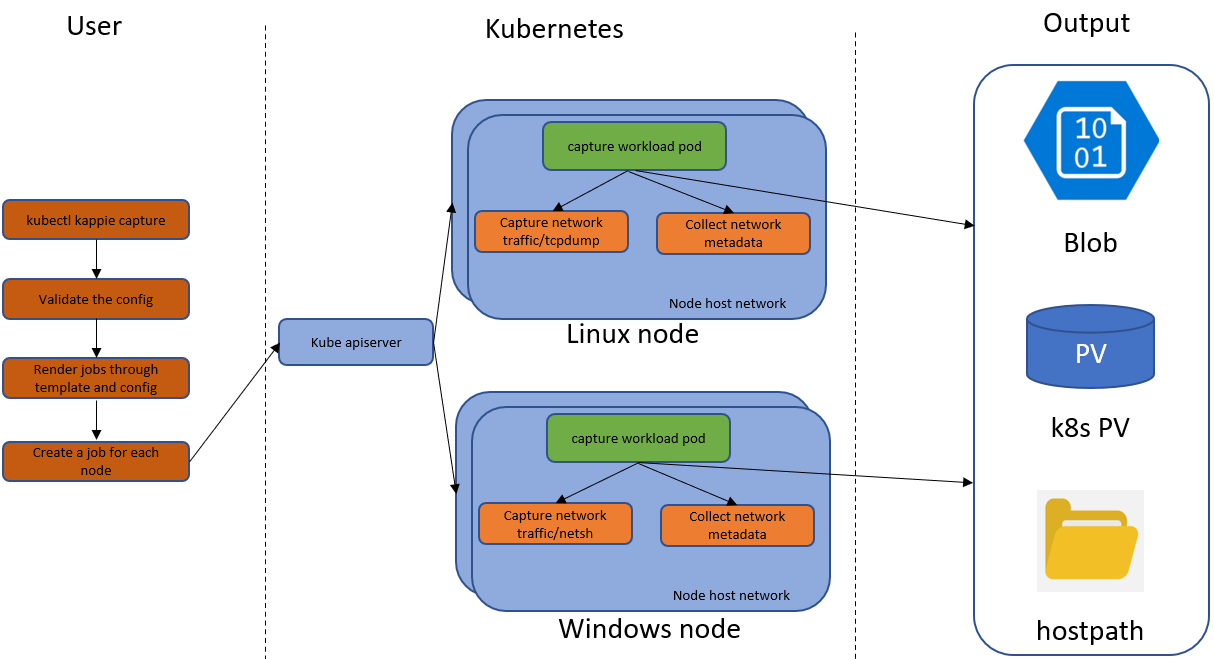
In this capture mode, running a command through the Retina CLI triggers the creation of a Kubernetes job that performs a capture based on a node selector. The default duration is one minute, but it can be configured via --no-wait=true to run continuously. Other options include capping the output file size, filtering by [ip]:[port], or filtering via a DNS query udp port 53.
Example capture with a 10-minute duration and a 100MB max output file size:
kubectl retina capture create --host-path /mnt/capture \
--namespace capture --node-selectors "kubernetes.io/os=linux" \
--duration=10m --max-size=100
CLI architecture diagram:
Via a CRD (Custom Resource Definition) deployment
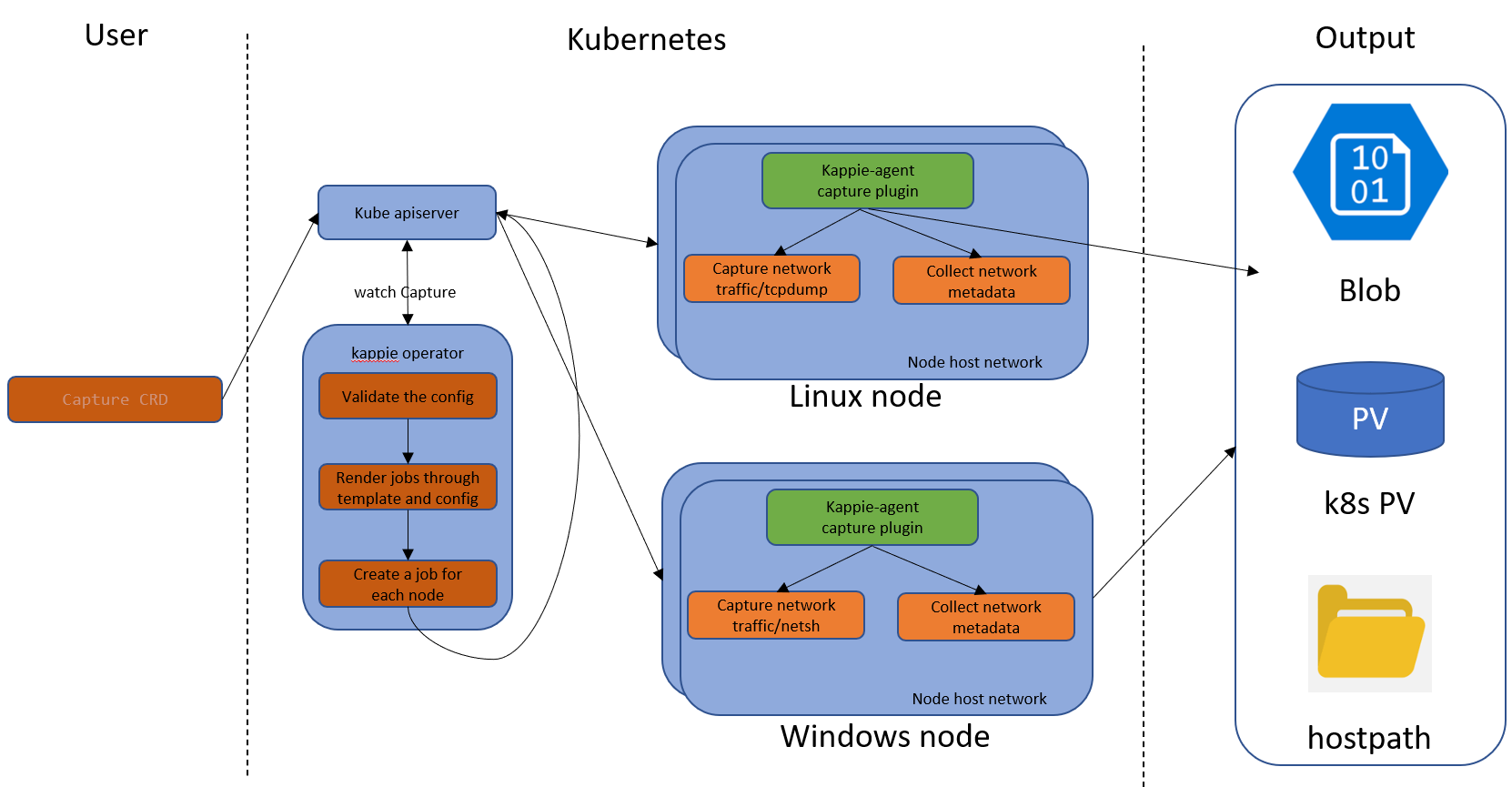
In this mode, deploying a Capture Kubernetes resource enables a service that performs continuous collection.
Example definition:
apiVersion: retina.sh/v1alpha1
kind: Capture
metadata:
  name: example-capture
spec:
  captureConfiguration:
    captureOption:
      duration: "30s"
      maxCaptureSize: 100
      packetSize: 1500
    captureTarget:
      namespaceSelector:
        matchLabels:
          app: target-app
  outputConfiguration:
    hostPath: /captures
    blobUpload: blob-sas-url
CRD deployment architecture diagram:
What does Retina capture?
Retina offers different capture modes:
Basic: Retrieves aggregated metrics per node (cluster/instance) and their metrics (number/size of transmitted packets, number/size of dropped packets, information returned by the netstat command)
Advanced: All Basic metrics plus context data (source/destination IP, source/destination namespace, source/destination pod, source/destination workload) and additional DNS-related metrics. Packet metrics are more detailed.
Configurable and extensible metrics
All these metrics are based on a plugin system that must be defined at Retina installation time. I’m not sure yet whether it’s possible to add or remove plugins post-installation, but I imagine this feature will be available later on.
What’s next?
From my perspective, I find that this tool fills a gap that existed in AKS: the lack of metrics. The tool is currently at version 0.0.3 as I write this article, but there’s a strong community around this project and I expect it to grow quickly. The ability to enrich metrics with customizable content is already planned and will address many use cases where teams need to add their own information. For my part, I wouldn’t use it in production yet as the project is still too immature, but I think it’s worth keeping an eye on (or a retina 😁). This project looks very promising indeed.